ⓘ Callsign lookups are in real time via the FCC database.
Vanity callsign availability is refreshed daily at 6:00 AM CST.
The vanity search may be unavailable for a few minutes during this update.
Live DX spots
Live DX Spots — 70cmvia PSKReporter · scroll or pinch to zoom
Geochron Atlas 2 4k World Clock (shows selected satellite "footprints" in real time)
I'm very new to satellite operations. I have the best equipment I could buy, but I really need to increase my skills. Here are my challenges:
My 9700 radio waterfall display looks like it has 18dB of attenuation in satellite mode so it's difficult to find transponder conversations. I like to do testing and experimenting at night because there's very few if anyone on at 2 or 3am. I'm having a difficult time "finding" my uplink signal to hear myself on the downlink. I know for transponders, to select REV on the radio to lock the uplink freq with the downlink freq, but I still don't hear myself. Since I'm using the S.A.T., I don't have to worry about doppler shift.
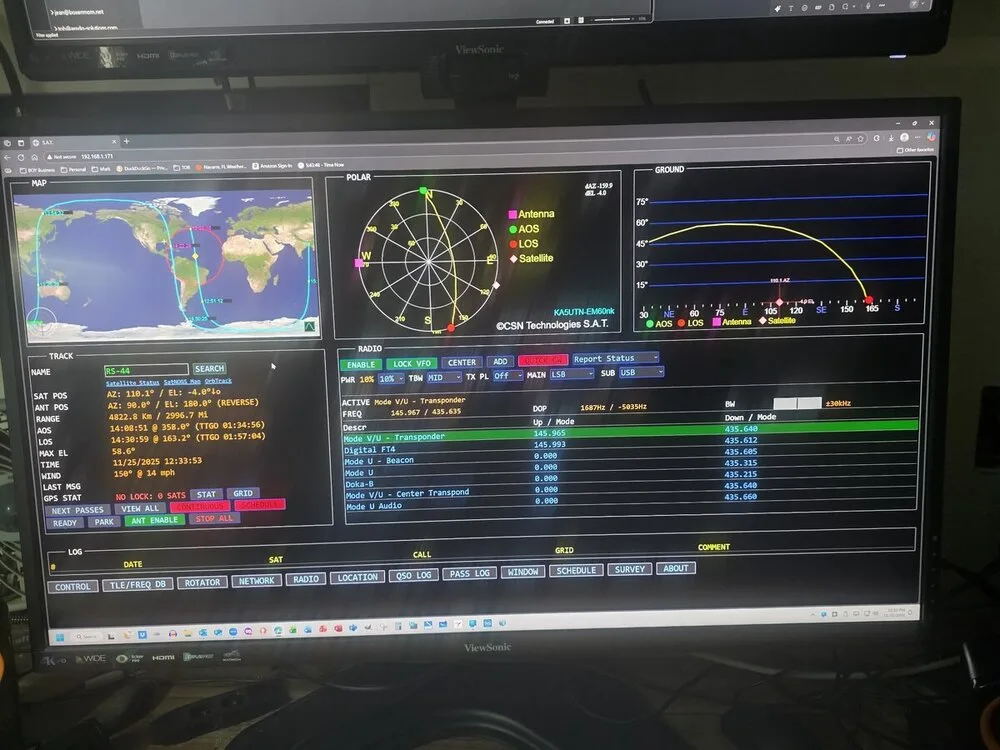
Any advice would be greatly appreciated. Here's a picture of my S.A.T. browser display.





Hello, I have the following equipment:
Icom IC-9700
CSN Technologies S.A.T
Yaesu G-5500 AZ & EL Rotors on a 19-foot tower
Geochron Atlas 2 4k World Clock (shows selected satellite "footprints" in real time)
I'm very new to satellite operations. I have the best equipment I could buy, but I really need to increase my skills. Here are my challenges:
My 9700 radio waterfall display looks like it has 18dB of attenuation in satellite mode so it's difficult to find transponder conversations. I like to do testing and experimenting at night because there's very few if anyone on at 2 or 3am. I'm having a difficult time "finding" my uplink signal to hear myself on the downlink. I know for transponders, to select REV on the radio to lock the uplink freq with the downlink freq, but I still don't hear myself. Since I'm using the S.A.T., I don't have to worry about doppler shift.
Any advice would be greatly appreciated. Here's a picture of my S.A.T. browser display.
Link to comment
https://www.hamradiobase.com/forums/topic/5798-great-satellite-system-but-low-skill-set/Share on other sites