Skip to content
View in the app

A better way to browse. Learn more.

Ham Radio Base

A full-screen app on your home screen with push notifications, badges and more.

To install this app on iOS and iPadOS
  1. Tap the Share icon in Safari
  2. Scroll the menu and tap Add to Home Screen.
  3. Tap Add in the top-right corner.
To install this app on Android
  1. Tap the 3-dot menu (⋮) in the top-right corner of the browser.
  2. Tap Add to Home screen or Install app.
  3. Confirm by tapping Install.
Ham Radio Base — Education, Resources, Projects and Community
☀ Solar
SFI 124
SN 83
A 4
K 1 Quiet
X-Ray B5.7
Wind 358.4 km/s
Aurora 1
Updated 21:00 UTC HamQSL · N0NBH
Day 80/40m Fair 30/20m Good 17/15m Fair 12/10m Fair
Night 80/40m Good 30/20m Good 17/15m Fair 12/10m Poor

Callsign Lookup
_
Vanity Call Signs Available
Enter filters above and click Search.
ⓘ Callsign lookups are in real time via the FCC database. Vanity callsign availability is refreshed daily at 6:00 AM CST. The vanity search may be unavailable for a few minutes during this update.
Live DX spots
Live DX Spots — 70cm via PSKReporter · scroll or pinch to zoom
Band
Mode
Time
Loading map data…
MHz DX Spotter Info
Recent spots —
Select a band above to load spots
Ready — select a band to fetch live spots

Beta testing • Applications open

Ham Radio Base SDR Connect

Help shape a flexible software-defined radio and panadapter application built for real-world amateur radio stations.

Apply to become a Beta Tester

One Application. Many Radio and SDR Configurations.

Ham Radio Base SDR Connect is currently under development with the goal of bringing spectrum visualization, waterfall displays and radio control together in a single application. We want to support a wide range of external panadapters, SDR receivers, I/Q interfaces and rig-control applications rather than limit operators to one manufacturer's equipment.

We are looking for approximately 12 active amateur radio operators who already use SDR or panadapter equipment and are willing to help us test, troubleshoot and expand compatibility across different station configurations.

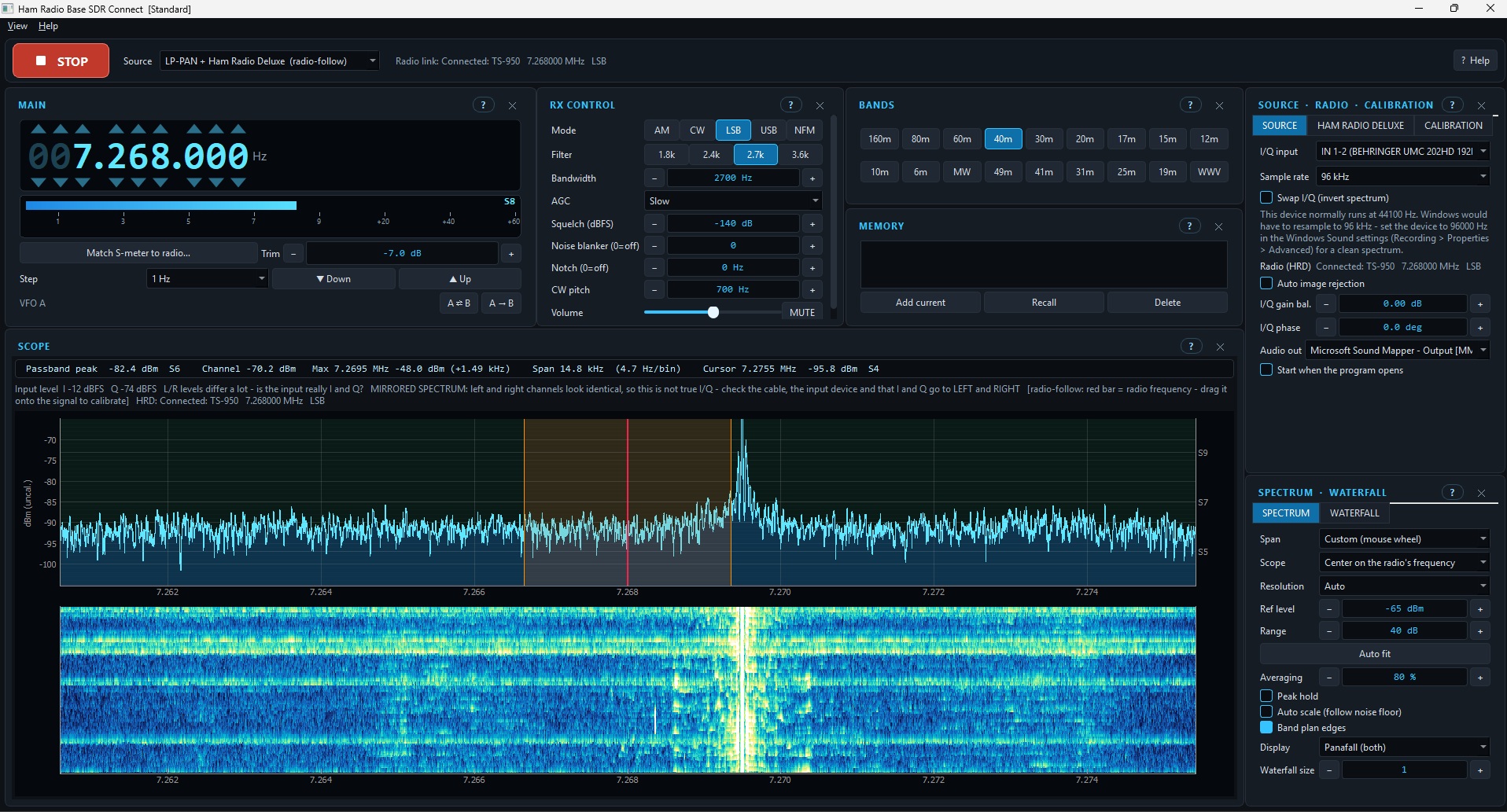
A First Look at SDR Connect

SDR Connect main screen showing frequency display, receiver controls, spectrum and waterfall, connected to a TS-950 using LP-PAN and Ham Radio Deluxe
Main application screen. Live spectrum and waterfall, receiver controls, band selection, memories and radio-follow operation using LP-PAN and Ham Radio Deluxe. Select the image for a larger view.
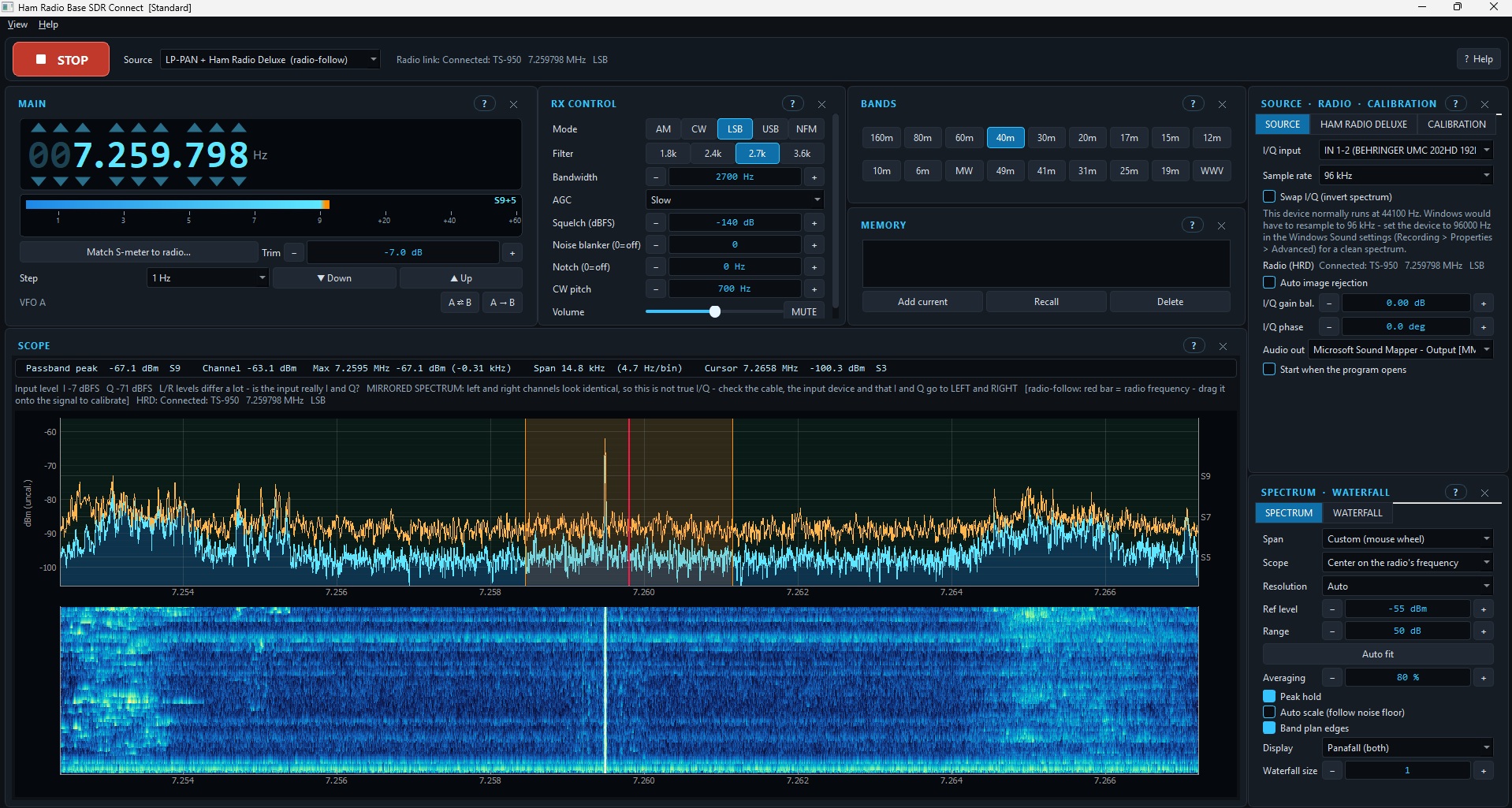
SDR Connect spectrum with orange peak hold trace above the cyan live signal trace and waterfall
Spectrum peak hold. The orange trace retains observed signal peaks, making intermittent signals and changes in activity easier to identify. Select the image for a larger view.

Screenshots show a development build. Features, appearance and compatibility may change during the beta.

What We Are Working Toward

Live Spectrum and Waterfall

Visualize signals across an adjustable frequency span, with spectrum averaging, peak hold, reference levels and waterfall controls.
Flexible SDR and Panadapter Support

Work toward compatibility with sound-card I/Q panadapters, SDRplay receivers, USB SDRs and other supported receiver interfaces as integration options become available.

Radio Integration

Explore frequency and mode synchronization through Ham Radio Deluxe, OmniRig, Hamlib, manufacturer CAT interfaces and other rig-control methods.

Station-Specific Calibration

Evaluate signal levels, frequency offsets, I/Q balance, sample rates and other adjustments across different radios, receivers and audio interfaces.

These are development objectives, not a guarantee that any particular brand, model or interface is supported today.

Who Should Apply?

We want a varied group of testers, including operators using equipment and software such as:

Radios and Receivers

  • Icom, Kenwood, Yaesu, Elecraft and other transceivers
  • Older radios with IF outputs or external panadapters
  • Modern radios with digital or network interfaces
  • Standalone SDR receiver configurations

SDR and Rig-Control Methods

  • LP-PAN and other analog I/Q panadapters
  • SDRplay, RTL-SDR, Airspy and other SDR hardware
  • Ham Radio Deluxe, OmniRig, Hamlib and direct CAT control
  • Serial, USB, network or custom integration methods

You do not need to be a software developer. Practical operating experience, a working station configuration and the ability to provide useful technical feedback are what matter most. Unusual or less common configurations are especially welcome.

Beta Tester Responsibilities

Selected testers must agree to actively participate throughout the beta and:

  • Install development builds and test them regularly with their own equipment.
  • Submit at least one bug report, feature request or satisfactory operation report every 30 days. A simple report confirming that everything is working correctly meets this requirement.
  • Report significant bugs promptly with reproduction steps, software versions, equipment details and relevant diagnostic information.
  • Be willing to share relevant, authorized API documentation, sample JSON, configuration files or diagnostic logs when requested to help integrate their equipment or rig-control software.
  • Remove passwords, API keys, tokens, private information and other secrets before sharing. Do not share material you are not authorized to redistribute.
  • Test responsibly; do not rely on beta software for critical communications or unattended transmitter control.

Beta Licensing and Monthly Participation

Selected beta testers will receive access to download SDR Connect and an assigned beta license key to install on their computer. The software periodically checks the Ham Radio Base license server to verify that the license remains active and the tester is meeting the participation requirements.

30 Days Without Feedback

A reminder banner will appear in the software asking you to submit a bug report, feature request or confirmation that the software is working correctly.

60 Days Without Feedback

If no submission is received within the additional 30 days, you will be removed from the Beta Tester group and your beta license will be deactivated. The software will cease to function under that license.

The purpose of this policy is to keep the beta group active and ensure each tester contributes to development. You do not have to find a bug to remain in good standing.

How Testers Will Be Selected

Applications will be reviewed based on equipment diversity, existing SDR experience, integration methods and willingness to participate consistently. Our aim is to cover as many distinct station configurations as practical within a small, manageable test group.

Submitting an application does not guarantee selection. Selected applicants will be contacted through their Ham Radio Base account with further instructions.

Help Build the Future of SDR Connect

Tell us about your radio, SDR hardware, rig-control setup and operating experience. Your station could help us bring SDR Connect to a wider amateur radio audience.

Apply to become a Beta Tester

Approximately 24 testers • Ham Radio Base membership required to apply


Affiliate Disclosure: As an Amazon Associate, Ham Radio Base earns from qualifying purchases. Some links throughout this website may be affiliate links. If you purchase a product through one of these links, we may earn a commission at no additional cost to you. Your support helps us continue creating free articles, tutorials, reviews, and resources for the amateur radio community. N0TLB © Ham Radio Base - Powered by the Ham CQ DX Community. All rights reserved.

Search

Search

Configure browser push notifications

Chrome (Android)
  1. Tap the lock icon next to the address bar.
  2. Tap Permissions → Notifications.
  3. Adjust your preference.
Chrome (Desktop)
  1. Click the padlock icon in the address bar.
  2. Select Site settings.
  3. Find Notifications and adjust your preference.